I've Moved!

I've Moved!
Please visit my new blog!

This blog contains affiliate links!

Some of the links in the posts on this blog are “affiliate links.” This means if you click on the link and purchase the item, I will receive an affiliate commission (Thank you!) Regardless, I only recommend products or services I believe will add value to my readers.
Email me ..........................
Showing posts with label PicFolio. Show all posts

Wednesday, August 15, 2012

Custom Coverset – Mitten Memories

533154_4256463011026_1091908073_n

Look what my UPS man dropped off this week from the Creative Memories digital center – ready to fill with our summer memories!  This year we decided to play tourists in our home state of Michigan.  We took several shorter trips within the Lower Peninsula and had a blast! 

You can easily create a similar coverset for your travel memories!

The You Create It Albums can be customized using Storybook Creator Plus or online at the Digital Center using templates provided by Creative Memories.  (Please use my consultant ID  #96470395 when ordering from the Digital Center.  I am also happy to help you create your custom album.  This is easily done via the internet & email or I’m happy to meet with you in person if you’re local. 

These custom coversets can hold Side Loading Sleeves – perfect for digital page prints, custom album pages (digitally created and printed right on scrapbook refills) or traditional  scrapbook pages, 12x12 PicFolio pages – pocket pages that you simply slide in your photos or scrapbook refill pages.  You can also combine page types – it’s up to you!

Here are the products I used for my Mitten Memories You Create It Album:

State of Michigan outline, robin & apple blossom image - North American Road Trip Digital content – no longer available but I can use my digital content to create a page for you.  Contact me for more information!  (I have A LOT of digital content – including Disney kits – Cars, Mickey & Friends, Princesses, etc.) that are no longer available.)

Background paper – Enchanted Summer digital kit

“Escape” graphic in lower right hand corner – Destinations Digital Kit

For the graphics representing the stops on our trip I used various images that I found on the internet and erased what I didn’t want (white backgrounds, unwanted content, etc) with the wand tool. I also just used a nice font for “Charlevoix” LHF Goldsmith & “Frankenmuth” Heidlelbe-normal

I used the Text Shape tool in SBC+ to create “Mitten Memories” and “2012 Summer Tour”.  This tool lets you take any font on your computer and give it a nice border.

I’d love to see your custom album designs!!  You can email them to me or share them in my Facebook group!

Tuesday, January 27, 2009

My new love – digi scrapping!

Digital Scrapbooking – I have been dabbling a bit with this new method of memory keeping and am so happy with the results. I use CM’s Storybook Creator Plus (SB+) to make my digital stuff & LOVE it! It is easy to use and I am thrilled that CM offers both digital and traditional versions of its papers and embellishments. This came in very handy when I was doing an album of our HS class reunions. I had some printed photos but wanted to do some digital pages – I was glad I could use both digital and traditional papers & elements that matched. Here’s an example of a page I did digitally, using the digital version of the Everyday Power Pallette (which comes with SB+ along with the digi Gazebo PP):


The page that sits right next to the one above in my album I did with real paper & stickers from the traditional Everyday Power Pallette:


DigiScrapping has simplified my life! (at least a small part of gift giving is easier)


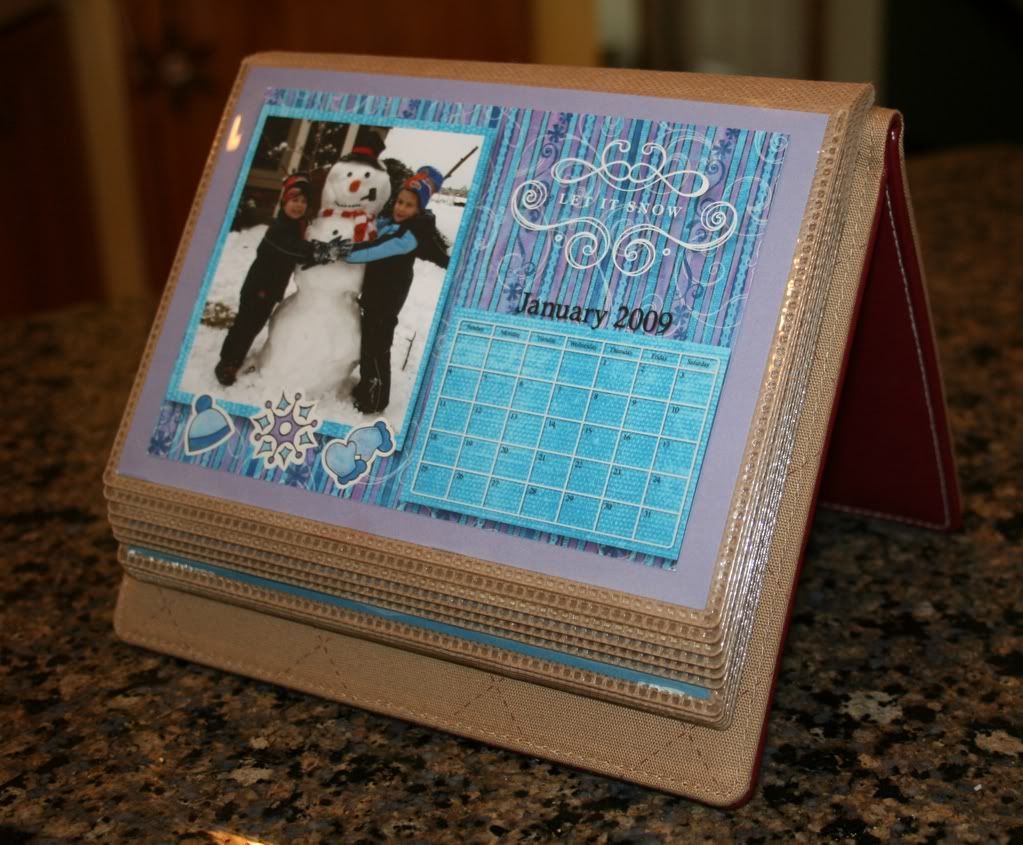
Each year I make PicFolio Calendars for Christmas gifts – I started out making 5 of these by hand – they were gifts for the In-Laws, my Mom, Great Grandmothers & Rich. I used a PicFolio Minutes album and made a calendar page for each month along with a coordinating page for the other side of the album. I would print out the calendars & pictures, trim, matt, use a ton of stickers & paper - ugh! It was quite time consuming, but of course it was a labor of love and I was really glad to see that these albums were very well received! Each year I make calendar refills for the PicFolio albums. This is sooo much easier since I started making these digitally! I only make 3 copies now, as the great grandmothers are no longer with us, but I could just as easily make 5 or 500! I just create them once & order as many prints as I need!


Here’s an example of a couple digitally scrapped PicFolio Calendar inserts for this year:


And here’s a picture of the calendar using the PicFolio album:


(If you click on the picture it will take you to the complete calendar album)


I also use SB+ to create our holiday cards & birthday invites, too! Here’s this years picture I sent out with the Christmas cards:


Which reminds me of what motivated me to post about digi scrapping (better late than never!)


Richie is “Star of the Week” in his 1st grade class. He wanted to bring in some pictures, so we were scrolling through Memory Manager (another post altogether, but another fantastic program!) choosing which pictures he wanted to bring in when he decided he wanted to put some digi scrapped pictures together. Within an hour or so we made 6 photo collages that I printed out at home to share with his class. Here’s my favorite:


and Richie’s favorite:


Nana suggested using the picture of the Pikachu cupcakes as a background!


I have posted more example of items I created using StoryBook Creator Plus on my CM Idea Sharing site under “Digital


Have a great day!