I've Moved!

I've Moved!
Please visit my new blog!

This blog contains affiliate links!

Some of the links in the posts on this blog are “affiliate links.” This means if you click on the link and purchase the item, I will receive an affiliate commission (Thank you!) Regardless, I only recommend products or services I believe will add value to my readers.
Email me ..........................
Showing posts with label Memory Manager. Show all posts

Friday, September 4, 2015

Sale on ALL Art Kits at Panstoria and on Historian, too!!

Sale at Panstoira.com

  • 25% OFF all art kits
  • 25% OFF Historian (already have it? Tell your friends! This is a great deal!)

But you'll want to hurry!

These discounts end Monday, Labor Day (9/7) at 11:59pm, EDT. 

Panstoria Historian - an upgraded version of CMs Memory Manager

Historian is the upgraded version of CM's Memory Manager.  Memory Manager is no longer supported - so if you use MM I HIGHLY recommend taking advantage of this sale and upgrade now.  Historian works seamlessly with your existing Memory Vaults in MMIf you're not familiar with MM or Historian click here to read more about this powerful, (yet easy to use) program that will help you organize, edit, preserve and share your digital memories.

Panstoria Digital Content

Click here to see all digital content from Panstoria

Panstoria offers content that was formerly sold by CM.  You can view that here (be sure to click on the categories on the left so you don't miss out on anything.)

Have you lost CM art kits when moving your software to a new machine or after a computer crash?  If you have a valid activation code for a former CM art kit you can use the Art Kit Download Finder to reinstall your content.  You can find that tool here.

Tuesday, July 24, 2012

Resources for Memory Manager and Storybook Creator Plus

It’s no secret that I love Storybook Creator Plus (SBC+) and Memory Manager (MM).  These programs let you easily organize & edit your photos (MM) and create beautiful digital projects with just a few clicks of your mouse (SBC+).  These programs are very easy to use but just getting started sometimes can be overwhelming.  Luckily there are tons of resources for learning how to use these great programs!

Want to see what you can do with these programs? You filter which posts you are viewing by clicking on the categories listed under “Labels” on the lower right hand side of this blog. 

As your Creative Memories Consultant I’m also one of your resources!  I don’t want to just sell you stuff – I want to help you complete your projects!

When you are a digital customer of mine I’ll send you links to digital content to thank you for your business. 

Please use my CM ID number when ordering - #96470395

Free Artwork on my CM Website

Calendar pages, card templates, overlays, predesigned pages – lots of freebies can be found here! 

The free digital artwork is listed with the digital artwork for sale on my CM website.

free artwork

CMs Project Center is another great place to get inspired!  Complete instructions & ingredients are listed for all projects shown.  The Project Center is divided up into Traditional & Digital sections. You can find the link to the Project Center on the bottom left hand side of my CM website.  

pc

Within the Digital Section you’ll find Freebies (new ones are released every Freebie Friday) & links to CMs idea blog and Tips & Techniques.

Facebook

My facebook group (also called Lisa’s Workshop) is where I usually first post about CM, scrapbooking & photo related items. 

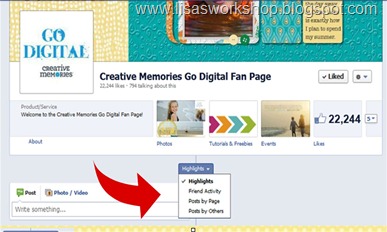
CMs Go Digital Facebook page is a great place to interact with other SBC+ & MM users.  To see posts by people other than the CM Go Digi page admins click on the tab in the middle of the page under the top section of the page & click on “Posts by Others”
others

image

There are some fantastic tutorials in the CM Go Digital FB group.  To access these click on “Tutorials & Freebies” underneath the cover photo.

cm go digi

image

CM Home Office also has a Facebook page – lots of great info there.

Help Zone on my CM websitehelp

Access the Help Zone by clicking on the link in the upper right hand corner of my CM website.

help zone

There are multiple sections within the Help Zone – you can choose them by clicking on the categories at the top of the page (the green arrow is pointing to these) or see all of them by clicking on the drop down menu (the red arrow is pointing to these).  Don’t forget to click “Go” if you use the drop down menu.

Pixels 2 Pages 

Pixels2Pages (P2P) is a web-based digital training subscription. The 90-day subscription gives unlimited access to a training and inspiration website featuring videos, training guides, idea galleries, blogs, monthly freebies and learning challenges for SBC+. From beginner to advanced digital users, subscribers will find encouragement to complete projects and learn the full functionality and creative potential of SBC+.

You can get an idea of what P2P is about when you click on the Free Trial tab at the top of the P2P home page.

p2p

Rewards club

Exclusive Digital content is sent to you via the Rewards club newsletter.  The Rewards club is a great way to earn 15% on every CM purchase, digital & traditional, with any CM Consultant!

rewards club

Thursday, January 19, 2012

New Creative Memories Products Coming Soon including CM Divine Wedding Cricut Cartridge!

Updated 1/30:

New in March - Fluffy & Fido 6x6 Stack Pack - what do you think this will be???? Also: Dear Mom & Grandparent Simply Said books; Spring, Summer & Beach Classic Stickers; Midnight Shimmer & Pink Shimmer Paper (Love these!); 12x12 Additions: Wedding Planning, Wedding Day, Fabulous Girl Toddler, Rugged Boy Toddler & Spring;  Divine Wedding Cricut Cartridge & scallop blade for the 12” Rotary Trimmer!  12x12 Wedding Quick Kit and 8x8 Wedding scrapbook kit.


Details are still fuzzy – I’ll update when I get them.  Just a reminder – these types of posts first appear to my Facebook Group’s wall.  Join Lisa’s Workshop on Facebook for the latest, most up to date info about CM!

Most of these products should be available in March, 2012

Coming soon - a "singular sensation" shape maker. It is being compared to the border maker system!   Imagine having ONE punch with several shapes instead of a gazillion punches. 

UPDATED 1/23     NEW PICTURES -

I am still waiting on full details – CM treats new product info like it’s a state secret Winking smile

Custom Album Page – like a digital print but prints right on the page!         8x8 $5.99 U.S./$7.99 CAN and for 12x12 - $7.99 U.S./$8.99 CAN

Custom Album Page

Another shot of the Embossed Paper Pack

Enchanted Embossed Paper

Reflections File Mate Set

Reflections File Mate Set

Not sure but those shapes – the circle/mesh & circle borders are showing up in a few spots – wonder if they’ll be new cartridges for the Border Maker System?National Scrapbook Day 2012 a

Baby’s First Year Calendar Templates – perfect gift for a new Mom!  All she’ll have to do is add pics (and fill in the dates or you could do that for her Smile)

image

SNEAK PEAK – National Scrapbook Day!

I think this is the “Best Of” Paper Pack

image


PREVIOUSLY POSTED:

Memory Manager Update!!

image

Enchanted Collection

image

image

Enchanted Coversetimage

Embossed Cardstock

image

image

Bling!

image

Fancy Frame Bundle...with the Best of Paper Sampler Pack, Frame, mat & blades...$49.  I believe this will  be a NSD (National Scrapbook Day)  promotion.  NSD is in May so these won’t probably be available until then.  There will also be a “Best of” paper pack available.

image

Divine Collection.

imageimage 

Enjoy!

Tuesday, February 2, 2010

Paper + Digital = Hybrid!

Being a Creative Memories Consultant I sometimes decorate blank albums with new product to have on display. I try to use products that I will be able to use myself but sometimes I make things with no end project in mind. When the Cherish papers came out I fell in love with them and couldn’t wait to play with them! I just love the richness of the colors and the patterns in this line. CM had a Cherish kit for a 7x7 album – complete with pre-cut pages, stickers, vellum shapes and an idea for each page (I love not having to re-invent the wheel!) I made up the album just like the examples shown in the book that came with the kit. I showed it off & then it sat on my shelf for a loooong time :)

My 10 year wedding anniversary was last September & I knew I wanted to do an album for my husband but wanted to keep it simple. He's not a scrapbooker & barely tolerates having his picture taken ;) I pulled out the Cherish album that was just waiting for photos & decided to fill it with pictures of us throughout the years. I used Memory Manager to sort through the thousands of pictures I have to find favorites of Rich & I together (this is super easy to do if you tag your photos in Memory Manager). I imported those into Storybook Creator Plus and then converted them to sepia. I added some digital elements from the Cherish Digital kit (which is available as a FREE DOWNLOAD here) and others that coordinated (mostly from the Romance digital kit) and a few other embellishments (from the digital freebies on the CM Project Center) and then printed them out 4x6” an put them into my Cherish album.

Here are a few pictures I used in the album:

This one uses a free photo mask from the CM Project Center

4x6 landscape - Page 005 

4x6 landscape - Page 009

This one I used the magic wand tool to remove all the color from the picture, except for the flowers. 

4x6 landscape - Page 001

A few pictures of the album pages:

IMG_8663

IMG_8665

IMG_8667

IMG_8664

Super easy & quick.

The Cherish 7x7 kit isn’t available anymore but the 12x12ish paper is – you can find it here (while supplies last) in the clearance section of my CM website at a fantastic price!

I love this album & so did Rich! Hope you like it, too!

Thursday, January 15, 2009

Digital Done in Four Webinars by CM

Do you have digital photos? Need help organizing them?? Are you curious about digital scrapbooking? I am so excited about this series of live Web classes that CM is offering. These webinars will guide you through the process of organizing your photos and completing your first Storybook project. Even if you do not plan on ordering a Storybook - these great webinars are an easy, free way to learn about digital scrapbooking & organizing.

There are 4 sessions and each session is offered a variety of times & dates. Different CMCs will be doing the training so if you have time, you may want to sit in on more than one webinar - each CMC will offer her own tips & tricks.

Start with the Right Tools
Digital Done-in-Four Webinars will use Memory Manager 2.0 and StoryBook Creator Plus software. For a sneak peek of what you’ll be learning, check out the short video, It’s a Digital Life.

These Webinars have been recorded! Click here to listen to them at your convenience.

Let me know if you have any questions!